LXC and Docker containers are parts of the show now!

By: Thomas Trenz | Date: December 16, 2016 | Comment: 0 | Category: Virtualization

Introduction

Containers make it easier to isolate applications and services on a shared Linux host. That flexibility is useful, but it can also make an inventory incomplete when the host is documented while the workloads inside it remain invisible. For IT teams, a server record alone does not always answer the operational questions that matter: which containers exist, are they running, and which network identities belong to them?

The original JDisc article announced the introduction of LXC and Docker discovery in build 3360. It explained that JDisc Discovery could discover both stopped and running LXC and Docker containers on Linux systems and display their status, assigned IP addresses, and MAC addresses. This updated article puts that release in context: container-aware discovery turns a host-only view into a more useful inventory of the workloads that actually run on it.

Historic article feature image: server room with network infrastructure

Why container visibility belongs in IT inventory

Traditional infrastructure inventory often starts with the physical or virtual Linux host. That is still essential: the host owns the operating system, compute resources and network connection. But containers add another layer of operational objects. A single host can run several isolated services, each with its own lifecycle and, depending on its networking configuration, its own IP and MAC address.

When this layer is absent from an inventory, teams can struggle to connect a service to the place where it runs. A running application may be known by name, while its container state and network identity are not documented alongside the host. Conversely, a stopped container can remain relevant during change planning, troubleshooting or a review of environments that should be cleaned up.

Container-aware discovery helps make that relationship visible. It complements the host record rather than replacing it, so IT teams can investigate Linux systems and the container workloads associated with them in the same inventory context.

What JDisc Discovery introduced for LXC and Docker

With build 3360, the original release added LXC and Docker discovery to JDisc Discovery. After Linux systems with LXC or Docker containers were scanned, the discovery results included container information such as:

  • the container status;
  • assigned IP addresses; and
  • assigned MAC addresses.

The release explicitly covered both stopped and running LXC and Docker containers. This distinction is important because an inventory should describe the actual state of the environment, not only the services that happened to be active at the moment of a scan.

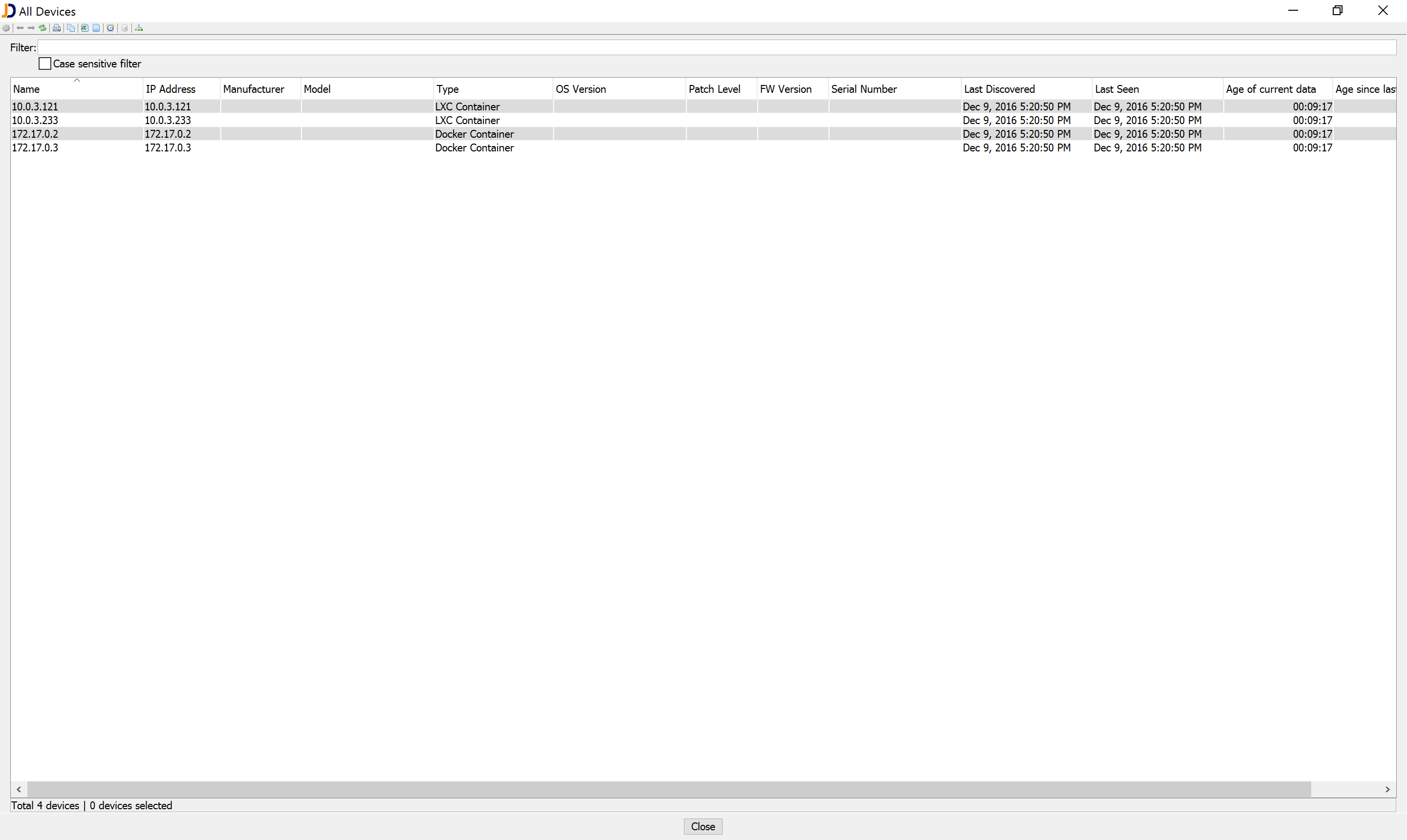
JDisc Discovery added discovered containers to the All Devices report list. That gave users a dedicated way to recognize containers in their reports instead of treating all results as ordinary host systems.

JDisc Discovery view showing discovered LXC and Docker containers

Turning container information into a useful operational view

The practical value of container discovery comes from putting a few related facts together. A Linux host tells you where a workload is hosted. A container record adds the workload layer. Its state and network identifiers help you decide what to investigate next.

For example, an administrator can use this information when reviewing a Linux environment before a change. A list of containers that are stopped can prompt a discussion about whether they are intentionally retained. A container IP address can help correlate the inventory with network documentation or another operational record. A MAC address can help distinguish network-facing container interfaces where that information is relevant.

This is also why detailed discovery is more useful than a simple reachability scan. A conventional IP scan can show that an address responds. An agentless network inventory provides the richer context needed to understand devices and workloads in the environment. JDisc Discovery is designed to discover a broad range of systems and infrastructure; its product overview describes virtualization discovery as part of that wider view.

A sensible way to use container discovery results

Container data is most useful when it is reviewed as part of normal inventory work, rather than as a separate, one-time list. A practical approach is to:

  1. scan the Linux systems in scope using the appropriate access and discovery configuration;
  2. review the discovered LXC and Docker container records alongside their host systems;
  3. look at state, IP address and MAC address data when investigating a workload or preparing a change; and
  4. use reports or exports to share the relevant inventory view with the teams responsible for Linux, networking or service operations.

This approach keeps the focus on verified inventory data. It does not assume that every container must be reachable independently, nor that every container has the same networking setup. Instead, it provides a consistent place to start when a team needs to understand what is present on a Linux host.

Container discovery as part of a broader discovery strategy

LXC and Docker are only one part of a heterogeneous IT environment. Reliable documentation normally needs the surrounding systems as well: hosts, virtual infrastructure, network devices, installed software and the relationships that make up the service environment. The goal is not to create a separate tool or spreadsheet for every technology layer, but to retain enough context for teams to make sound decisions.

For the historic release, that meant bringing LXC and Docker containers into the same reports as the rest of the discovered environment. For users evaluating JDisc Discovery today, the useful next step is to validate the relevant discovery scope in their own environment with the free trial download and confirm which data is collected for the systems they manage.

DownloadTeaserImage Isometric IT network diagram showing a central hub connected to servers, cloud, globe, router, wireless access point, security camera, workstation, and storage units via dotted lines.

Your Network, No Secrets!

No Blind Spots. No Surprises. Just Full Network Visibility!

Conclusion

The 2016 LXC and Docker discovery release addressed a simple but important gap: a Linux inventory is more valuable when it includes the container workloads associated with the host. By recording container status together with assigned IP and MAC addresses, JDisc Discovery made LXC and Docker containers recognizable in its reports.

That remains the central inventory lesson. When workloads are isolated inside containers, visibility should extend beyond the host so that operations teams can work from an accurate, useful view of their environment.

Frequently Asked Questions

The following answers cover the scope of the original LXC and Docker discovery release and how container information fits into IT inventory. They help clarify what was announced, which attributes were described, and why those attributes are useful in day-to-day operations.

The original article announced that build 3360 added LXC and Docker discovery to JDisc Discovery for Linux systems containing those containers.

The release stated that both stopped and running LXC and Docker containers were discovered.

The original announcement listed assigned IP addresses and MAC addresses, together with the container status.

The article stated that discovered LXC and Docker containers were added to the All Devices report list, making them recognizable in reports.

No. Container information complements the host record. The host remains the system on which the container workload runs, while container discovery adds a useful workload-level view.

Stopped containers can still be relevant during change planning, troubleshooting, cleanup reviews or when documenting the intended state of a Linux environment.

Not always. An IP address is one useful attribute, but its meaning depends on the container’s networking configuration and the host environment. Reviewing it together with the container and host context is more reliable.

Use the JDisc Discovery trial to test the discovery scope with your own Linux systems and configuration, then review the resulting records and reports.

About The Author

Thomas Trenz

Thomas Trenz co-founded JDisc GmbH in 2009 and is the company’s CEO. He has more than 25 years of hands-on experience in network discovery, IT asset management, CMDB integration, and enterprise infrastructure.

At JDisc, Thomas remains closely involved in the product direction and development of JDisc Discovery, an agentless network discovery and IT inventory solution used by organizations around the world. His work focuses on providing accurate infrastructure data while keeping discovery practical and manageable, even in large and heterogeneous IT environments.

Thomas writes about network discovery, IT inventory, CMDBs, cybersecurity, software asset management, cloud environments, and related infrastructure topics. His articles draw on product development experience and discussions with customers and partners, with an emphasis on practical approaches that IT teams can apply in real-world environments.

Leave a Reply

Your email address will not be published. Required fields are marked *