VLAN discovery: See switch ports and segmentation.

By: Thomas Trenz | Date: January 9, 2013 | Comment: 0 | Category: Development News, License Management

Introduction

VLANs are a practical way to segment a local network. They let you separate network traffic even when devices share the same physical switch, helping to organise environments for security, scalability and operations. But the value of segmentation depends on being able to see how it is configured: which VLANs exist, which switches participate in them, and which switch ports are assigned to each VLAN.

The original JDisc article introduced VLAN discovery as part of the JDisc Networking Add-On. It described a report for available VLANs, a detailed view of participating switches and ports, and VLAN information in the interface view. This updated article explains why that information remains useful for accurate network documentation and change planning.

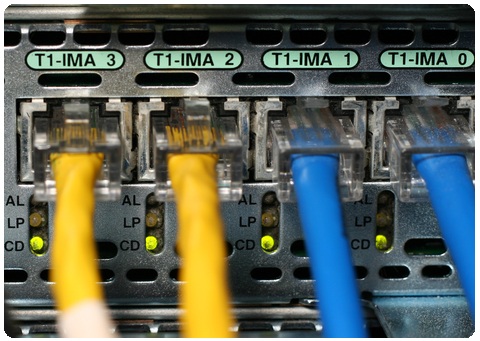
VLAN network discovery illustration with a network switch

Why VLAN information matters in network documentation

An IP address alone does not explain how a device is segmented at Layer 2. A workstation, server or network appliance can be connected to a port whose VLAN membership determines how its traffic is handled. This is particularly important in networks that separate user devices, servers, management interfaces, guest access or other functions into different logical segments.

Without a reliable view of VLAN assignments, even straightforward questions can take longer than they should. Which switches have ports in a specific VLAN? Which interfaces belong to it? Is a device being moved to another segment by changing a switch-port configuration? These are configuration and documentation questions, not just inventory questions.

The JDisc Networking Add-On extends JDisc Discovery with network-management capabilities. Its current product page describes VLAN discovery as well as the assignment of configured VLANs to router and switch ports, alongside topology discovery and configuration backup.

What the original VLAN discovery release introduced

The January 2013 announcement described VLAN discovery for the upcoming JDisc Discovery 2.9 release. The original scope included collecting information about VLANs and how switch ports were assigned to them.

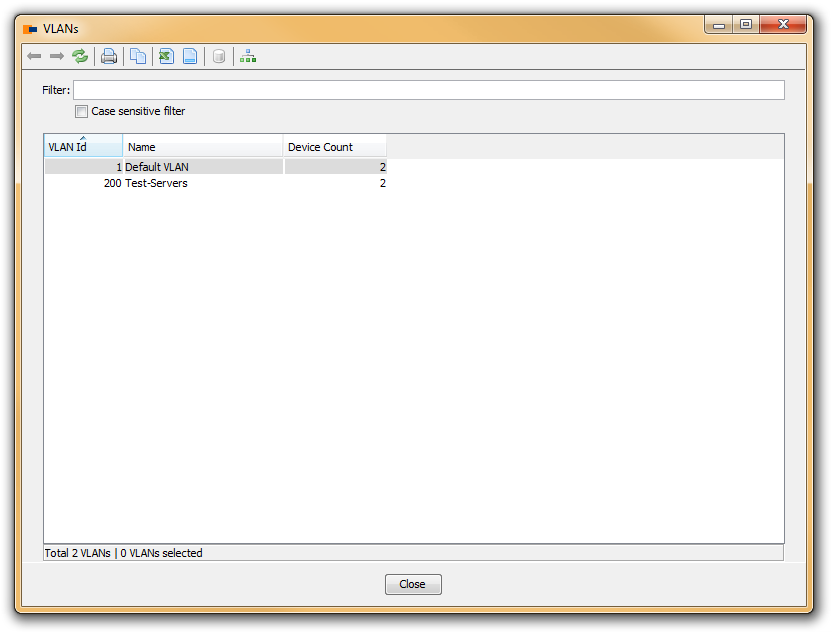
The new VLAN menu listed the available VLANs and showed how many switches had switch ports belonging to each VLAN. This gives administrators a useful starting point: instead of beginning with individual switch configurations, they can start with a VLAN and see where it is used.

JDisc Discovery VLAN report listing available VLANs

From a VLAN report to the participating switch ports

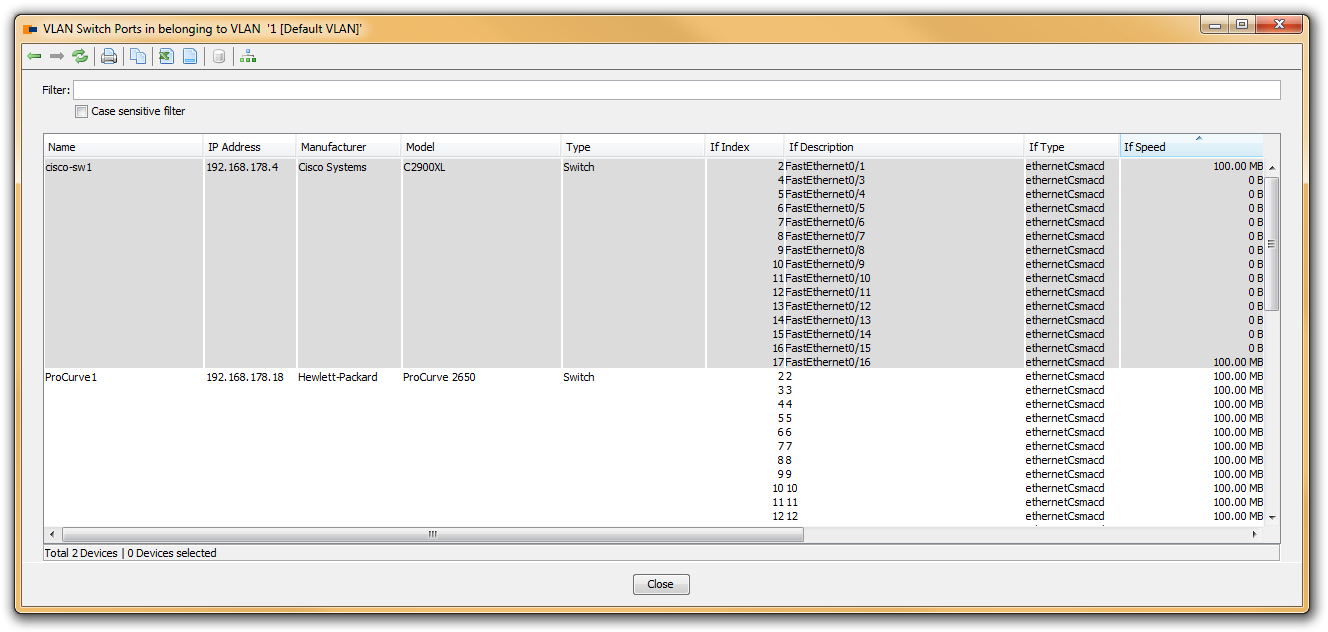
The VLAN list is valuable when it leads to the corresponding infrastructure details. The original article explained that users could open a report for a selected VLAN by double-clicking it. That report listed the switches and the switch ports belonging to the selected VLAN.

This relationship is useful during a number of common operations:

  • reviewing the extent of a network segment before a change;
  • finding the infrastructure locations where a VLAN is configured;
  • documenting which ports are associated with a segment; and
  • checking a configuration after a device move or port change.

The purpose is not to replace sound network design or change control. It is to give the people responsible for the network a current, structured view of the configuration information they need to investigate.

JDisc Discovery report showing switch ports for a selected VLAN

Viewing VLAN membership on a switch interface

Sometimes the most useful starting point is a specific switch rather than a VLAN. The original feature also displayed a VLANs column in the interfaces view. It listed all VLANs configured on a switch port.
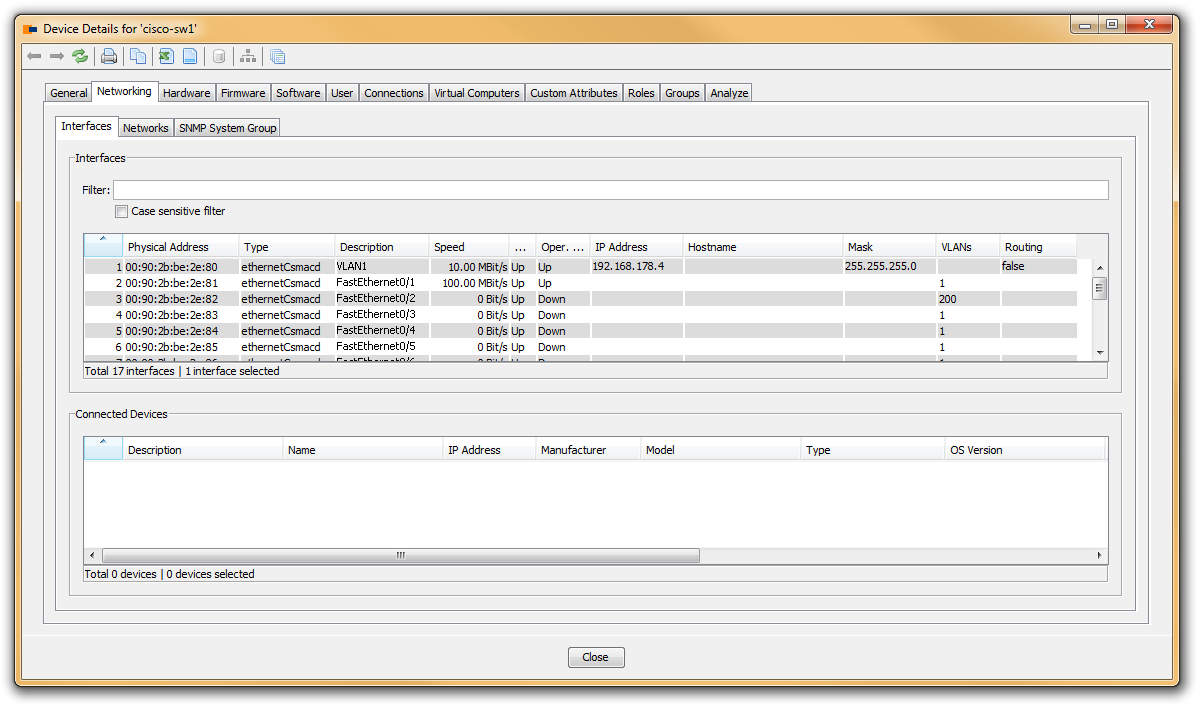
This port-centred view helps connect a physical interface to its logical role. If an administrator is investigating a port, the VLAN list provides immediate context about the configured segmentation. It is especially helpful when switch-port assignments are part of a relocation, a topology review or a troubleshooting process.

JDisc Discovery network interface details showing configured VLANs

VLAN discovery in a broader networking view

VLAN information is strongest when it is considered together with the rest of the network context. JDisc Networking can create logical Layer 3 and physical Layer 2 topology maps, and the product page describes the use of CDP, LLDP and port-forwarding information for topology discovery. VLAN discovery adds another useful dimension: it connects a logical segment with the switches and ports that carry it.

For example, topology can help explain how infrastructure devices connect, while VLAN information helps identify the segmentation applied at the relevant interfaces. Configuration backup and change history can provide further context when a team needs to understand how a switch configuration changed over time. Together, these views make network documentation more actionable than a list of isolated device records.

A practical approach to reviewing VLANs

VLAN data is most useful when it is integrated into routine documentation work. A practical review can begin with the VLAN report, then move to the switches and ports associated with a relevant segment. From there, teams can correlate the information with their topology and their operational change process.

When using any discovery result, it is sensible to validate it against the intended scope and access configuration. VLANs and port assignments are configuration data, so the quality of the result depends on the devices that are included and the information that can be collected from them. The JDisc Discovery trial provides a way to validate the relevant discovery scope in your own environment.

Conclusion

The VLAN discovery release announced in 2013 addressed a key part of network documentation: making VLANs and their port assignments easier to review. By offering a VLAN list, a report of participating switches and ports, and VLAN details in the interface view, JDisc Discovery helped connect logical segmentation with physical network infrastructure.

That remains a useful operational principle. Reliable network documentation should help you move from a question about a VLAN to the switches and interfaces where that VLAN is configured.

Frequently Asked Questions

These answers explain the scope of the original VLAN discovery announcement and how VLAN data supports practical network documentation. They cover the reports described in the release, the relationship between VLANs and switch ports, and useful ways to investigate segmentation.

A VLAN is a method of logically segmenting network traffic on a local network. Devices can be separated into VLANs even when they are connected to the same physical switch.

The announcement described collecting information about VLANs and the assignment of switch ports to those VLANs.

The report listed available VLANs and the number of switches with switch ports that belonged to each VLAN.

The original article stated that double-clicking a VLAN opened a report listing switches and the ports belonging to the selected VLAN.

In the switch interface view, the VLANs column displayed the VLANs configured on a switch port.

Changing a device’s switch-port VLAN configuration can be part of moving it to another network segment. VLAN information helps administrators review the affected configuration and documentation.

No. VLAN discovery and topology provide different but complementary context. VLAN data describes segmentation and port assignments, while topology helps show the network relationships between devices.

Use the JDisc Discovery trial with the appropriate systems and access configuration, then review the collected VLAN and port-assignment data.

About The Author

Thomas Trenz

Thomas Trenz co-founded JDisc GmbH in 2009 and is the company’s CEO. He has more than 25 years of hands-on experience in network discovery, IT asset management, CMDB integration, and enterprise infrastructure.

At JDisc, Thomas remains closely involved in the product direction and development of JDisc Discovery, an agentless network discovery and IT inventory solution used by organizations around the world. His work focuses on providing accurate infrastructure data while keeping discovery practical and manageable, even in large and heterogeneous IT environments.

Thomas writes about network discovery, IT inventory, CMDBs, cybersecurity, software asset management, cloud environments, and related infrastructure topics. His articles draw on product development experience and discussions with customers and partners, with an emphasis on practical approaches that IT teams can apply in real-world environments.

Leave a Reply

Your email address will not be published. Required fields are marked *